
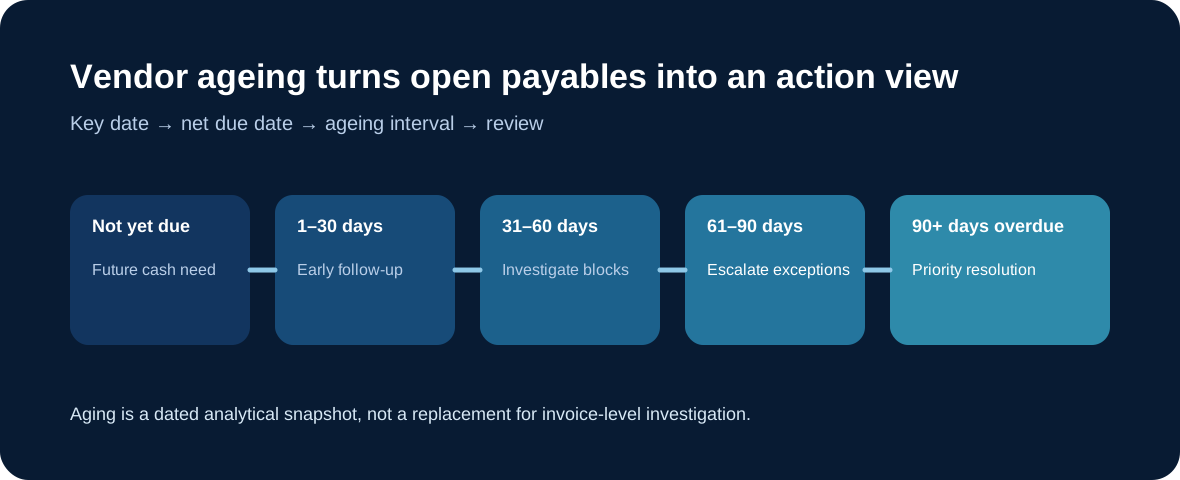
Vendor ageing analysis groups open supplier payables into time intervals using a chosen key date and due-date logic. It helps Accounts Payable see what is not yet due, what is overdue, how long liabilities have remained open, and where follow-up should be prioritised.
What an ageing view actually tells you
SAP's Aging Analysis for payables distinguishes total, future and overdue payable amounts and can break them down by company code, supplier, currency and ageing interval. The Accounts Payable aging report likewise organises open items into due-date periods so teams can see when supplier liabilities are expected to be settled.
The key date matters
The same supplier portfolio can look different on different key dates because items move from future due to overdue as time passes, while clearing changes the open-item population. Read ageing with the report date, payment terms and net due dates in mind.
Old does not automatically mean wrong
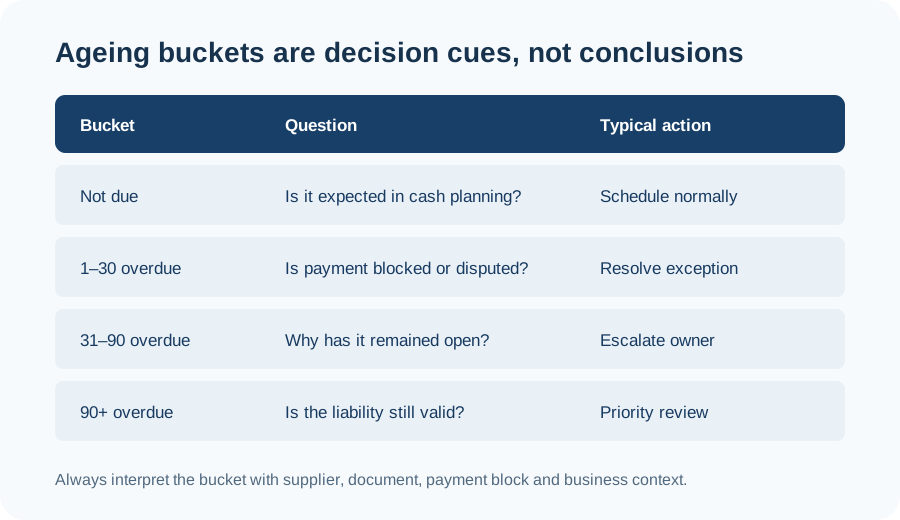
An older item may be waiting for dispute resolution, payment approval, a missing credit memo, a payment block or a legitimate contractual milestone. A newer item can still deserve urgent attention if already overdue or important to supplier continuity. Ageing supports prioritisation, but business context determines the action.
Useful review questions by bucket
For not-yet-due items, focus on cash planning and readiness. For newly overdue items, check payment blocks, master data and unresolved invoice issues. For significantly overdue balances, ownership, dispute status and validity of the liability become more important.
Consultant thinking: separate analysis from root cause
A good design does not treat ageing as a standalone KPI. Confirm the key date, due-date calculation, currency view, supplier scope and treatment of cleared or special G/L items, then connect the output to the operational process that resolves exceptions.
Continue with Vendor Account Clearing, Partial Payment vs Residual Payment, Duplicate Invoice Checks, and the SAP FI / FICO hub.