
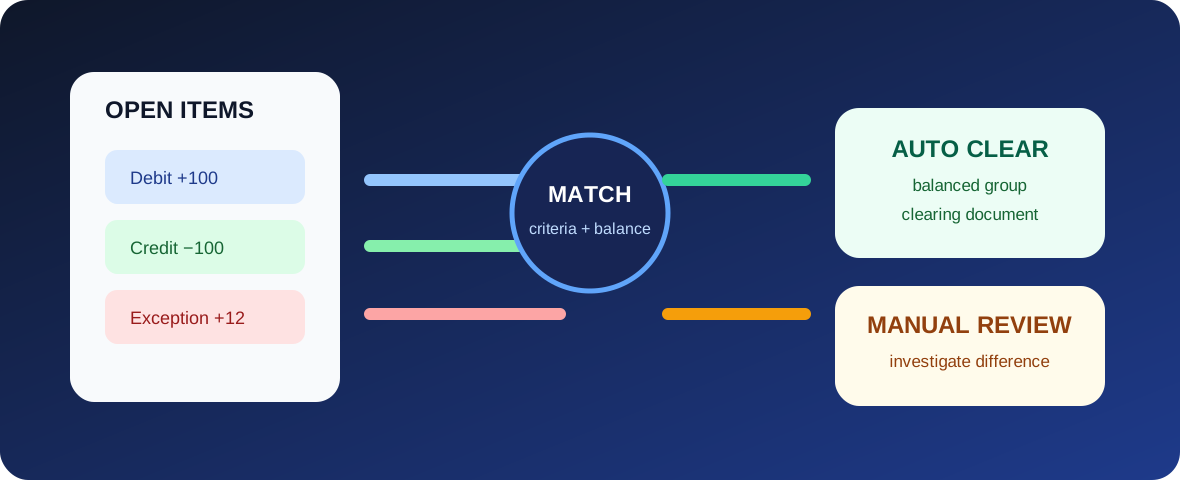
Automatic clearing uses predefined grouping criteria to find open debit and credit items that can be cleared together without user-by-user selection. Manual clearing lets an accountant select and evaluate the relevant open items directly, and where supported handle differences or additional posting requirements. The right choice depends on how predictable the matching logic is, whether balances meet clearing rules, and whether the exception needs business judgement.
What clearing actually means
An open item represents an accounting transaction that is not yet economically closed. A customer invoice remains open until it is matched with a receipt or another valid offset. A supplier invoice remains open until payment or another clearing event closes it. Some G/L accounts are also managed on an open-item basis so that unresolved balances can be tracked at line-item level.
SAP Help describes open-item management as requiring items in an account to be cleared by other items, with the account balance represented by the remaining open items. Clearing therefore is not simply hiding old line items; it records which items have been matched and gives the resulting items a clearing reference and clearing date.
How automatic clearing works
SAP's automatic clearing logic selects open items for the accounts and value ranges included in the run, groups them using fixed criteria and configurable user criteria, and clears only groups that meet the required balance conditions. Current SAP S/4HANA documentation describes automatic clearing for customer, supplier and G/L accounts, including common use in GR/IR clearing accounts.
Grouping is central. Company code, account, currency and other system criteria protect unrelated transactions from being matched together. Additional criteria can narrow a group further, such as a reference field or purchasing document context. If the group is not eligible to clear, the items remain open instead of being forced into a false match.
What manual clearing adds
Manual clearing is useful when a human needs to choose the exact open items, understand the business relationship, or manage a difference that cannot be resolved by a simple zero-balance match. SAP provides manual clearing functions for G/L and other open-item scenarios, and clearing can create a clearing document that records the completion of the relationship.
The business value is controlled judgement. For example, two postings may have similar amounts but belong to different transactions. An accountant may need supporting evidence before selecting them. A small difference may be valid under a defined tolerance, or it may point to a pricing, tax, exchange-rate, duplicate-posting or reference problem that should be investigated rather than written away.
Controls that matter
- Matching criteria: criteria should reflect a real business relationship, not just make more items clear.
- Tolerances: small-difference rules should be approved and monitored; they are not a substitute for investigating recurring errors.
- Simulation and review: where available, review the proposed groups before production updates, especially when rules change.
- Exception ageing: items repeatedly left open should be investigated for process, master-data or interface causes.
- Period control: clearing dates and any required postings must fall in permitted accounting periods.
- Segregation of duties: users resolving unusual differences should operate within the organization's approval and access model.
The clearing design sits on top of open item management, because only accounts and items intended for open-item tracking should enter the clearing process. Tolerance groups matter where acceptable differences are permitted, while posting period variants determine whether related clearing postings can be made on the intended date.
Consultant thinking: automate the rule, not the uncertainty
The strongest clearing design begins by asking why two items belong together. If that relationship can be expressed reliably through fields and balance conditions, automation can reduce repetitive work. If the relationship depends on incomplete references, unclear business events or exception judgement, manual review is safer until the upstream process is improved.
Persistent manual work is therefore a diagnostic signal. It may point to weak reference data, inconsistent payment advice, poor interface mapping, duplicate transactions or a clearing rule that does not reflect how the business actually operates.
Key takeaway
Automatic and manual clearing are complementary controls. Automatic clearing is best for high-volume, rule-based matching; manual clearing is the disciplined path for exceptions and judgement. The goal is a reconciled account whose cleared items are supportable and whose remaining open items are meaningful.